Starbucks Rewards App has become one of the most popular coffee loyalty programs in the world, giving millions of customers the ability to earn Stars, redeem them for free food and beverages, and enjoy personalized offers.
In this ultimate 2026 guide, we’ll cover everything you need to know — from how to download and log in to how to check your Starbucks Rewards online free, and advanced hacks to maximize your benefits.
Whether you’re new to the program or a long-time member, this guide will help you unlock every hidden perk.
What is the Starbucks Rewards App?
The Starbucks Rewards App is a mobile loyalty program that allows members to earn Stars (points) for every purchase. These Stars can be redeemed for free coffee, espresso drinks, bakery items, sandwiches, snacks, and merchandise.
Unlike traditional punch-card loyalty programs, the app provides:
Personalized offers based on your buying habits
Bonus Star challenges for faster rewards
Mobile order & pay convenience
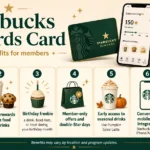
Birthday rewards (free drink or food item)
Exclusive member-only perks
It’s more than just an app — it’s your gateway to Starbucks rewards login, balance tracking, and exclusive deals.
How to Download and Set Up the Starbucks Rewards App
Getting started is simple.
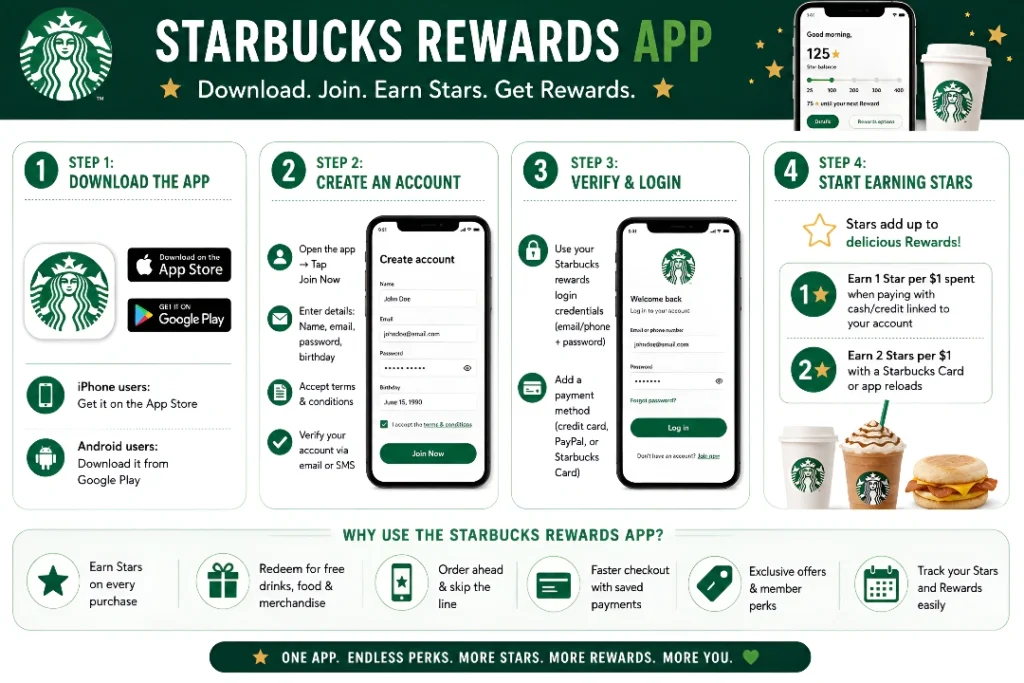
Step 1: Download the App
iPhone users: Get it on the App Store
Android users: Download it from Google Play
Step 2: Create an Account
Open the app → Tap Join Now
Enter details: Name, email, password, birthday
Accept terms & conditions
Step 3: Verify & Login
Use your Starbucks rewards login credentials (email/phone + password)
Add a payment method (credit card, PayPal, or Starbucks Card)
Step 4: Start Earning Stars
Earn 1 Star per $1 spent (when paying with cash/credit linked to your account)
Earn 2 Stars per $1 with a Starbucks Card or app reloads
Starbucks Rewards App Login – Step by Step
Logging in is straightforward, whether via the app or the website.
Starbucks Rewards Login Process:
Open the Starbucks Rewards App
Tap Sign In
Enter your email/phone number + password
Tap Login
👉 If you forget your password, tap Forgot Password to reset via email or SMS.
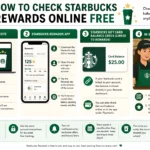
How to Check My Starbucks Rewards Online Free
Many people ask: “How do I check my Starbucks Rewards balance online?”
Here’s how:
Method
Steps
Pros
Cons
Starbucks Rewards App
Log in → Tap “Rewards” → See Stars & offers
Fast, real-time updates
Requires app install
Starbucks Website
Visit Starbucks.com → Login → Check dashboard
Works on any device
Needs internet access
In-Store
Ask barista at checkout
Easy if ordering
Not convenient otherwise
Receipt Check
Balance printed at the bottom
Automatic
Requires purchase
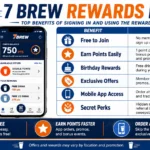
Starbucks Rewards App Benefits
Benefit
Details
Free Birthday Drink
Choose any handcrafted beverage or food item
Mobile Order & Pay
Skip the line by ordering ahead
Bonus Star Challenges
Earn extra Stars for completing challenges
Double Star Days
Get 2x points on promotional days
Exclusive Offers
Personalized discounts via email or push notification
Faster Checkout
Save payment methods & pay with one tap
Starbucks Rewards Tiers
Unlock benefits with higher Star accumulation
Starbucks Rewards App Tiers (2026)
The redemption system is simple:
Stars Needed
Reward
Examples
25 Stars
Add-ons
Extra espresso shot, syrups, dairy alternatives
100 Stars
Brewed Coffee or Tea
Hot coffee, iced tea
200 Stars
Handcrafted Drinks
Lattes, frappuccinos, cold brew
300 Stars
Food Items
Sandwiches, salads, bakery
400 Stars
Merchandise
Tumblers, mugs, packaged coffee
Starbucks Rewards App Hacks to Earn Faster
Reload with Starbucks Card/App → Always pay with app balance to earn 2 Stars/$1.
Join Bonus Challenges → Complete missions for extra Stars.
Use Double Star Days → Mark these on your calendar!
Link PayPal or Chase Card → Earn Stars + credit card rewards.
Refer Friends → Get bonus Stars when friends join.
Buy Packaged Coffee in Grocery Stores → Enter codes to earn Stars.
Keep an Eye on Seasonal Promotions → Starbucks often offers buy 2 get bonus Stars.
Starbucks Rewards App vs Competitors
Feature
Starbucks Rewards
Dunkin’ Rewards
McDonald’s Rewards
Free Birthday Drink
✅ Yes
✅ Yes
✅ Yes
Mobile Order & Pay
✅ Yes
✅ Yes
✅ Yes
Points per $
2 Stars per $1 (with reloads)
10 pts per $1
100 pts per $1
Exclusive Offers
✅ Highly personalized
❌ Limited
✅ Seasonal deals
Secret Menu Access
✅ Yes (with customization)
❌ No
❌ No
Starbucks Rewards App and iPhone Users
Many people search for Starbucks loyalty app iPhone. The iOS app offers:
Download the app, create an account, and start earning Stars instantly.
3. Can I check my Starbucks Rewards online free?
Yes, via the app, website, or by asking in-store.
4. Do Starbucks Rewards points expire?
Yes, Stars expire after 6 months if not redeemed.
5. What is the Starbucks birthday reward?
A free drink or food item of your choice during your birthday month.
6. Can I redeem rewards on mobile orders?
Yes, rewards can be applied at checkout in the app.
7. Can I transfer Stars to friends?
No, Stars are non-transferable.
8. How do I earn Stars faster?
Reload the app, use bonus challenges, and shop during Double Star Days.
9. What is the minimum Stars needed for a reward?
25 Stars (e.g., extra espresso shot or syrup).
10. Can I use rewards internationally?
Rewards work in most Starbucks locations, but some regions may vary.
11. What if I didn’t receive my Stars?
Keep your receipt and contact Starbucks Rewards support.
12. Does Starbucks have a student discount?
Not officially, but students can still earn Stars and rewards.
13. Can I add multiple payment methods?
Yes, including PayPal, credit cards, Apple Pay, and Starbucks Card.
14. Can I access the Starbucks secret menu through the app?
Not directly, but you can customize drinks to create secret menu favorites.
15. How do I contact Starbucks Rewards support?
Use the Help tab in the app or call customer service.
Final Sip: Why You Should Download the Starbucks Rewards App Today
The Starbucks Rewards App is more than just a mobile ordering tool — it’s a powerful loyalty program that gives you free coffee, exclusive offers, and personalized perks. By mastering login steps, tracking Stars online free, and using hacks like Double Star Days, you can maximize every dollar spent at Starbucks.
👉 If you love coffee and want to save money while enjoying your favorite drinks, there’s no reason not to join.
Download the Starbucks Rewards App today and start earning Stars with every sip.







1 thought on “Starbucks Rewards App”
Comments are closed.