If you’re a coffee lover, chances are you’ve visited Starbucks at least once for your favorite latte, cappuccino, or iced coffee. But did you know that every sip could earn you points toward free drinks, exclusive perks, and seasonal offers?
That’s exactly what the Starbucks Rewards Card (digital or physical) is all about. It’s not just a loyalty card — it’s your gateway to unlocking Starbucks Rewards, collecting Stars, and enjoying free food and beverages faster.
In this detailed guide, we’ll walk you through:
What the Starbucks Rewards Card is
How to sign up and log in
Ways to earn and redeem loyalty points (Stars)
Step-by-step login and account management
Starbucks birthday rewards and exclusive perks
Starbucks app vs. rewards card usage
A detailed FAQ section with 15+ answers
By the end, you’ll know how to use your Starbucks Rewards Card like a pro — saving money while enjoying your favorite brews.
What is the Starbucks Rewards Card?
The Starbucks Rewards Card is part of the Starbucks Rewards Program — a loyalty system that lets customers earn Stars for every purchase. These Stars can then be redeemed for free drinks, food, merchandise, and other perks.
You can use a physical Starbucks Rewards Card or a digital card via the Starbucks Rewards App on iPhone or Android.
Feature
Details
Type
Physical card or digital app card
Points System
Earn Stars (loyalty points) per $1 spent
Redemption
Free drinks, bakery items, sandwiches, and more
Cost to Join
Free
Login Options
Starbucks app, Starbucks loyalty website
Perks
Birthday rewards, exclusive offers, early access
👉 Fun fact: Starbucks has one of the largest loyalty programs worldwide, with over 30 million active members.
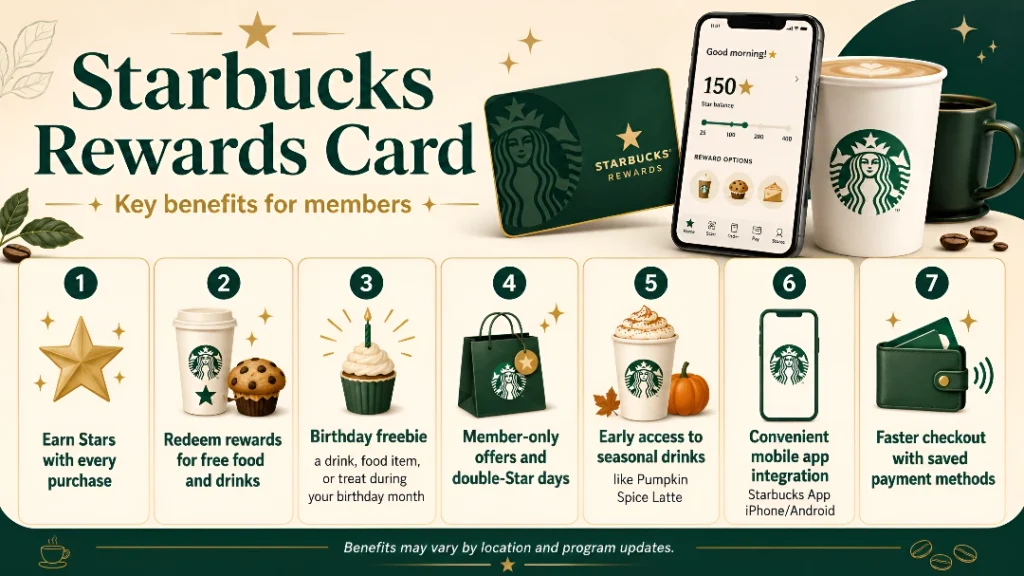
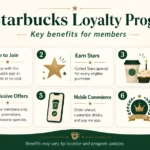
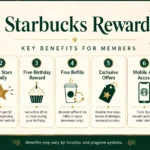
Starbucks Rewards Card Benefits
Why should you sign up? Because the benefits go beyond just coffee discounts.
Key Benefits
Earn Stars with every purchase
Redeem rewards for free food and drinks
Birthday freebie — a drink, food item, or treat during your birthday month
Member-only offers and double-Star days
Early access to seasonal drinks (like Pumpkin Spice Latte)
Convenient mobile app integration (Starbucks App iPhone/Android)
Faster checkout with saved payment methods
How to Sign Up for a Starbucks Rewards Card
Joining is quick and easy.
Step-by-Step
Get the Card or App
Pick up a physical card at any Starbucks store OR
Download the Starbucks Rewards App on iPhone or Android
Create an Account
Visit the Starbucks loyalty website or app
Enter your name, email, phone number, and password
Register Your Card
If you have a physical card, link it to your account online
Start Earning Stars
Use your Starbucks Rewards Card every time you buy something
Starbucks Loyalty Login – Managing Your Rewards
To access your rewards, you need to log in.
Starbucks Rewards Login Process
Open the Starbucks app or website
Tap on Rewards Login
Enter your email and password
Alternatively, use Starbucks loyalty card login (card number + PIN)
Access your dashboard showing:
Star balance
Reward wallet
Purchase history
👉 Pro Tip: Enable auto-reload on your card for faster checkouts.
How to Earn Starbucks Rewards Points (Stars)
Stars = Rewards. Here’s how to rack them up:
Action
Stars Earned
$1 spent (using Rewards Card)
1 Star
$1 spent (using Starbucks App preloaded card)
2 Stars
Bonus Star promotions
Varies
Double-Star days
2x Stars
Partnered credit cards
Extra Stars
👉 Using the Starbucks Rewards App often doubles your Stars compared to the physical card.
How to Redeem Starbucks Rewards
Once you collect enough Stars, you can redeem them:
Stars Required
Reward
25 Stars
Customize a drink (extra shot, syrup)
50 Stars
Brewed hot coffee, hot tea, bakery item
150 Stars
Handcrafted drink, hot breakfast item
200 Stars
Lunch sandwich, protein box, salad
400 Stars
Starbucks merchandise, packaged coffee
Starbucks Rewards App vs. Rewards Card
App Users (iPhone/Android) get:
Mobile ordering
Digital card storage
Faster earning rates (2 Stars per $1)
Physical Card Users get:
Convenience if not using smartphones
Ability to reload in-store
👉 Best strategy: Use both together — register your card in the Starbucks App iPhone for maximum flexibility.
Starbucks Birthday Rewards
One of the best perks of the program:
🎉 On your birthday, you’ll get a free drink, food, or bakery item.
Just make sure:
You’re signed up at least 7 days before your birthday
You’ve made at least one purchase in the past 12 months
Troubleshooting – Starbucks Rewards Card Issues
Problem
Solution
Forgot login password
Reset via email or SMS
Card not working
Ensure it’s registered to your account
Stars not showing
Wait 24 hours or contact support
Lost physical card
Report it & transfer balance to a new one
App not syncing
Update app or reinstall
Comparison: Starbucks Rewards vs Competitors
Feature
Starbucks
Dunkin’ Rewards
McDonald’s Rewards
Stars/Points System
1–2 Stars per $1
10 pts per $1
100 pts per $1
Birthday Reward
✅ Free item
✅ Free drink
✅ Free fries
App Integration
Advanced (ordering, customization)
Basic
Moderate
Redemption Flexibility
Very High
Medium
Medium
👉 Starbucks still leads in variety of rewards and ease of redemption.
It’s a physical or digital card linked to the Starbucks Rewards Program, allowing you to earn and redeem Stars.
2. Is the Starbucks Rewards Program free?
Yes, signing up is completely free.
3. How do I log in to my Starbucks loyalty account?
Use the Starbucks app or website with your email and password.
4. Can I check my rewards online for free?
Yes, via the Starbucks loyalty website or app.
5. Do Starbucks Stars expire?
Yes, Stars expire 6 months after earning if not redeemed.
6. Can I transfer rewards to another person?
No, Stars are non-transferable.
7. Does Starbucks offer a birthday reward?
Yes, one free drink or food item.
8. How do I reload my Starbucks Rewards Card?
Reload in-store, via the website, or app.
9. Can I use multiple Starbucks cards?
Yes, but you should link them under one account.
10. What’s the difference between the app and card?
The app earns more Stars and provides mobile ordering.
11. How many Stars per dollar spent?
1 Star with physical card, 2 Stars with app card.
12. Can students use Starbucks Rewards?
Yes, anyone can join. Students often enjoy app promos.
13. What happens if I lose my card?
Report it and transfer your Stars to a new card.
14. Does Starbucks have exclusive offers?
Yes, members receive seasonal offers and bonus Star promotions.
15. Can I use my rewards internationally?
Yes, but availability varies by country.
Conclusion
The Starbucks Rewards Card is more than a loyalty card — it’s your passport to a world of free drinks, perks, and exclusive offers. Whether you prefer the Starbucks Rewards App on iPhone or the traditional card, this program ensures that every purchase adds value to your coffee experience.
If you’re not already a member, sign up today, start earning Stars, and enjoy the perks of being a Starbucks Rewards customer.






1 thought on “Starbucks Rewards Card”
Comments are closed.